

If you’re managing payroll across multiple countries, delays rarely come from the payroll run itself. They come from chasing payroll data, coordinating local vendors, validating payroll taxes, and ensuring employees are paid accurately and on time.
So, how long does it take to process payroll?
For most companies, payroll processing takes 1–7 business days. International teams often face longer timelines due to local compliance, registrations, and country-specific requirements.
This guide breaks down payroll processing time, what changes when you go global, and how different hiring models impact speed.
What Payroll Processing Time Actually Means

When people ask, “How long does payroll take to process?”, they’re typically referring to the entire payroll processing cycle, not just the moment employees receive their pay.
Payroll processing typically includes:
- Data collection: Timesheets, bonuses, overtime pay, expenses, and contract changes
- Calculation: Gross pay, tax withholdings, payroll deductions, and net pay
- Approval: Internal review and sign-off
- Disbursement: Releasing payments
- Statutory reporting: Filing payroll taxes and required government submissions
Whether you’re paying hourly employees or salaried employees, your payroll team has to ensure wages are paid accurately while complying with labour laws, minimum wage requirements, local taxes, and statutory obligations.
For international teams, the process may also involve:
- Employee benefits and health insurance contributions
- Employer tax contributions
- Country-specific payroll compliance requirements
- Multiple currencies and payment methods
One important distinction: Payroll processing time is the internal time required to process payroll before funds leave your company bank account.
It does not include direct deposit settlement times or the time it takes for employees to receive funds after payroll has been submitted.
This distinction matters because a payroll run can be complete internally while payday is still several business days away.
Understanding that difference helps teams build realistic payroll schedules, avoid delays, and better manage global payroll operations.
If you’re reviewing your current process, it also helps to understand how payroll software affects processing speed and where common bottlenecks appear in global payroll processing and payments.
How Long Each Step of Payroll Processing Takes
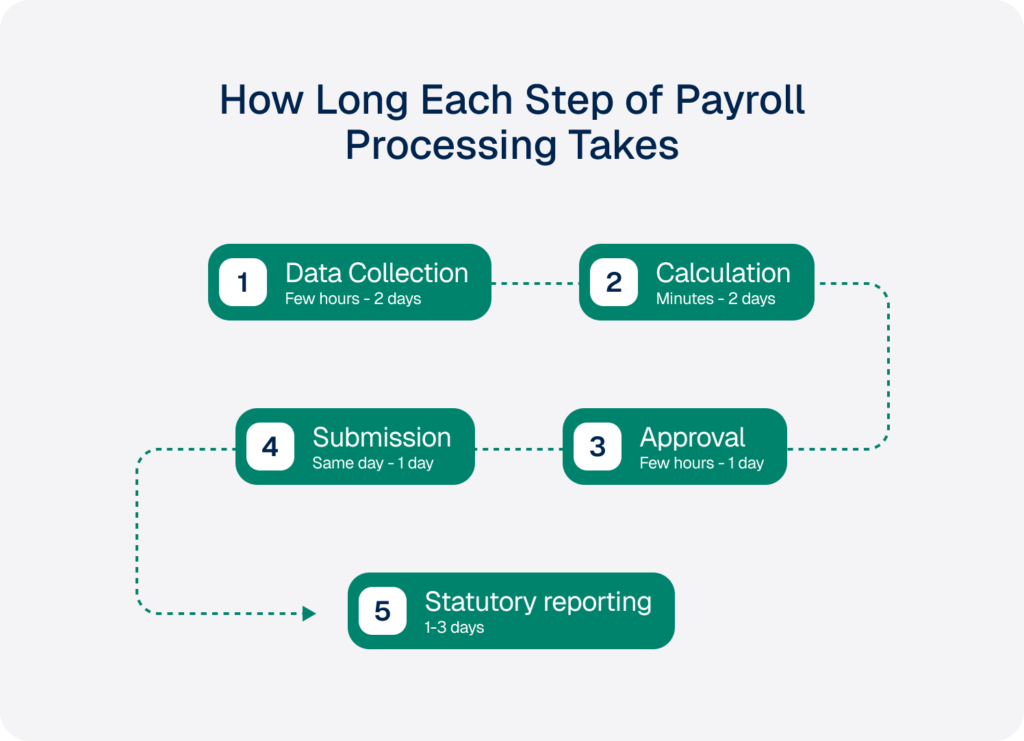
How long does payroll take to process? For most companies, payroll processing takes 1–7 business days. Teams using automated payroll software often complete the process in 1–3 days, while manual payroll processing can take longer.
Step 1: Data Collection
Typical time: A few hours to 2 business days
Payroll processing starts with collecting payroll data, including:
- Timesheets
- New starters and leavers
- Contract changes
- Bonuses and commissions
- Overtime pay
- Expense claims
- Employee benefits updates
The more fragmented your payroll data, the longer payroll will take to process. This is especially true for global payroll teams working across multiple countries or vendors.
For international hiring, local requirements can impact what data must be collected.
Step 2: Calculation (Gross-to-Net)
Typical time: Minutes to 2 business days
This stage includes:
- Gross pay calculation
- Tax withholdings
- Payroll deductions
- Employer tax contributions
- Federal income tax and federal payroll taxes
- Local taxes and local payroll taxes
- Net pay calculations
Automated payroll systems can complete payroll calculations in minutes. Teams that process payroll manually often take longer to validate tax calculations, minimum wage requirements, and labour laws.
Using an Employer of Record solution can simplify payroll compliance by embedding local rules into the payroll process.
Step 3: Approval
Typical time: A few hours to 1 business day
Before you run payroll, approvals confirm:
- Employee wages are correct
- Tax deductions are accurate
- Payroll records are complete
- Employees will be paid accurately
Approvals are usually straightforward within a single entity but can slow down when multiple countries, teams, and time zones are involved.
Step 4: Submission and Disbursement
Typical time: Same day to 1 business day
Once approved, payroll is submitted and payments are released from the company bank account.
This includes:
- Submitting payment files
- Authorising transfers
- Confirming payment methods
- Completing the payroll run for the pay period
Companies evaluating a new payroll provider should also consider how payment infrastructure affects payroll processing time. WorkMotion’s employment cost calculator can help estimate international employment costs before payroll begins.
Step 5: Statutory Reporting
Typical time: Same day to several days
Payroll processing does not end when employees are paid.
Organisations must also complete:
- Filing payroll taxes
- Social security submissions
- Benefits administration reporting
- Statutory filings
Requirements vary by country and are often where global payroll becomes more complex.
Many companies choose a specialised global payroll provider or payroll service provider to reduce compliance risk and administrative effort.
Processing Time vs. Deposit Time
Many teams confuse payroll processing time with direct deposit timing.
| Activity | Typical time |
|---|---|
| Internal payroll processing | 1–2 business days with automated payroll |
| Direct deposit settlement | 2–3 additional business days |
A payroll run can be completed internally while employees are still waiting for funds to arrive.
For example, if payday is Friday, payroll may need to be finalised by Tuesday or Wednesday. The date payroll is finished internally is rarely the date employees receive payment.
This is why every payroll schedule requires clear cut-off dates within the pay cycle.
How to Speed Up Payroll Processing

Most payroll delays are operational, not technical. If you’re looking to speed up payroll processing, focus on removing bottlenecks before the payroll run begins.
Set a Clear Payroll Calendar and Cut-Off Dates
A well-defined payroll calendar reduces confusion and last-minute changes.
Every team should document:
- The pay period
- The pay period end date
- Approval deadlines
- Submission dates
- Payment deadlines
This is especially important for monthly pay periods and multi-country teams, where local deadlines may differ.
Automate Calculations and Compliance Checks
Automated payroll reduces the time spent calculating wages, validating tax deductions, and reviewing payroll reporting requirements.
Compared with in-house payroll processing, modern payroll processing software can:
- Reduce manual data entry
- Automate payroll calculations
- Flag payroll compliance issues
- Simplify payroll reporting
Many organisations use dedicated HR compliance software solutions alongside payroll tools to reduce compliance risk and improve accuracy.
Integrate Workforce Management Systems
Disconnected systems create delays.
Integrating workforce management, time tracking, leave management, and benefits administration platforms helps ensure payroll information flows automatically into your payroll system.
This reduces duplicate work and makes it easier to manage payroll at scale.
Consolidate Payroll Vendors Across Countries
Many companies struggle because payroll processing involves multiple local providers, spreadsheets, and approval workflows.
Working with a single payroll provider or global payroll provider can simplify operations by centralising:
- Payroll data
- Local compliance requirements
- Payment methods
- Payroll records
Teams managing cross-border operations often discover that fragmented vendors often create cross-border compliance challenges.
Standardise Payroll Data Collection
Standard inputs accelerate payroll.
Use consistent formats for:
- Timesheets
- Employee changes
- Bonuses
- Payroll records
Fewer manual handoffs mean lower payroll costs, better cash flow visibility, and a more predictable payroll cycle.
These efficiencies matter even more for international teams, where country-specific requirements can quickly add complexity.
How Long Does International Payroll Take?
This is where many teams get payroll timelines wrong.
Recurring payroll is usually fast. Setting up payroll in a new country is what takes time.
First Payroll Run: 3–6 Months or 3–5 Business Days
If you’re using your own entity, the setup process can take 3–6 months before you can run payroll.
Typical requirements include:
- Entity registration
- Tax registration
- Social security enrolment
- Local bank account setup
- Employee benefits providers
- Country-specific payroll and employment requirements
This is why paying employees internationally often takes much longer than domestic payroll.
An alternative is outsourcing payroll through an Employer of Record (EOR). Because the legal infrastructure already exists, first payroll can often be completed in 3–5 business days rather than months.
For companies expanding internationally, WorkMotion’s Employer of Record model provides access to licensed in-country entities without requiring businesses to establish their own local presence.
Recurring Payroll: 1–3 Business Days
Once a country is live, international payroll looks much more like domestic payroll.
The typical payroll cycle remains largely unchanged:
- Collect payroll data
- Review payroll changes
- Complete payroll reporting
- Run payroll
- Submit payments
Most automated providers can process payroll in 1–3 business days. Often, recurring international payroll is faster because local compliance rules, tax calculations, and reporting requirements are already built into the platform.
This can help reduce payroll processing time and eliminate many of the delays associated with in-house payroll processing.
Why Compliance Infrastructure Matters
The speed of setup depends largely on whether compliance infrastructure already exists.
WorkMotion operates through its own licensed entities in core European markets, rather than relying solely on third-party partners. In Germany, this includes an AÜG licence, a key requirement for compliant employee leasing arrangements.
WorkMotion is also the first EOR provider to achieve the IEC Gold Compliance Certificate, providing independent validation across multiple payroll compliance and employment compliance domains.
For SMEs and small businesses expanding internationally, that means the first payroll run can be measured in days rather than months.
Manual vs Automated vs Outsourced Payroll
The payroll processing method you choose has a direct impact on how long payroll takes to process, how much administration is required, and how quickly you can enter new countries.
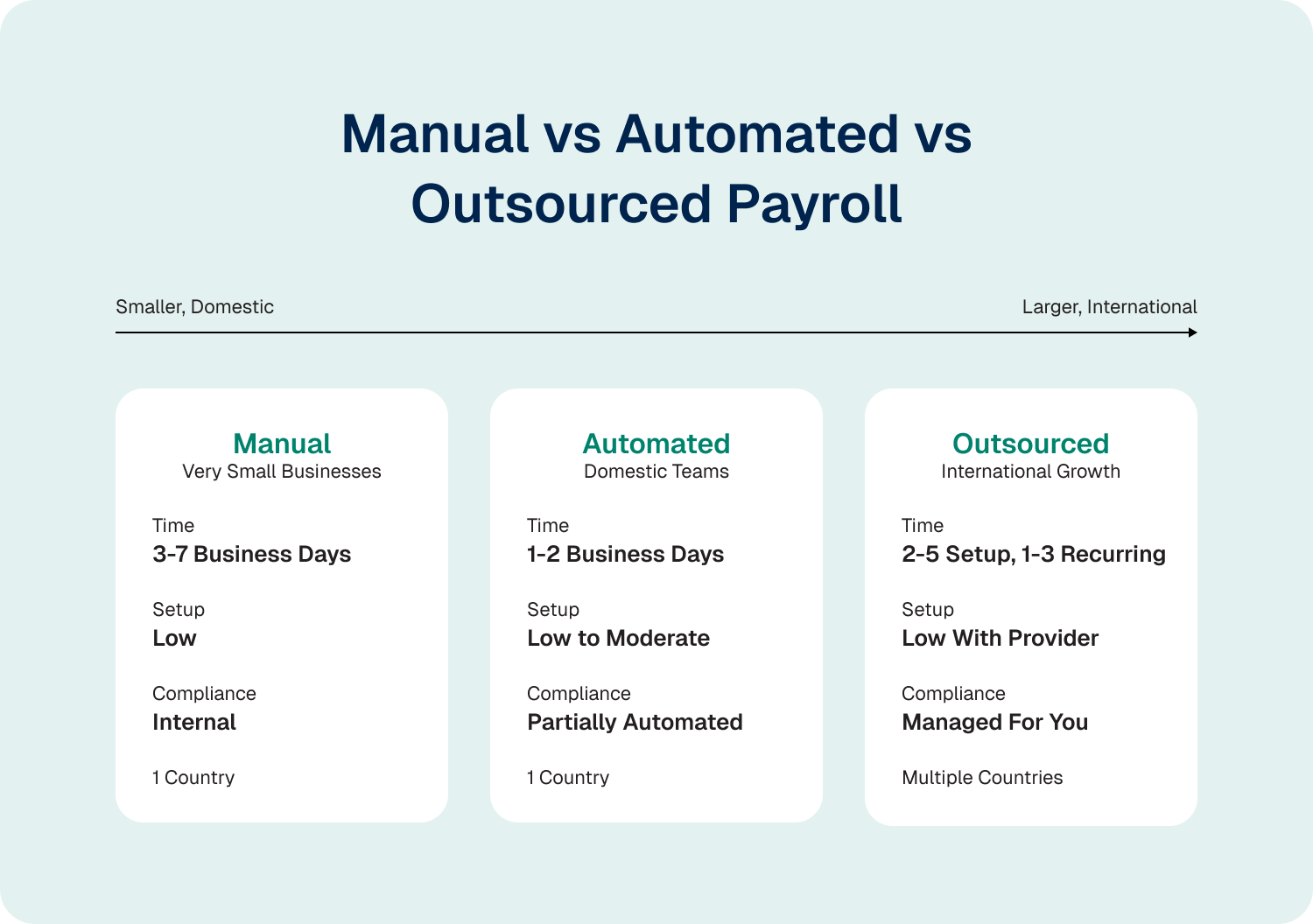
A quick rule of thumb:
- Manual payroll: Best for very small businesses but requires internal management of tax calculations, wage and hour laws, federal unemployment tax obligations, and local requirements.
- Automated payroll software: Reduces administrative work and helps reduce payroll processing time through payroll automation and built-in workflows.
- Outsourced payroll: A global payroll provider, professional employer organisation, or Employer of Record centralises payroll operations, compliance, and payment methods across multiple countries.
For example, WorkMotion’s Employer of Record model is designed to compress both setup and recurring payroll timelines.
Once a country is live, payroll runs on the same 1–3 day cycle as automated payroll, while compliance remains managed through WorkMotion’s local infrastructure.
If you’re weighing up different payroll models, seeing the process end-to-end is often easier than comparing feature lists.
Take a guided look at the WorkMotion product tour to see how different hiring and payroll models work in practice across multiple countries. Then, book a demo to discuss the fastest path for your specific expansion plans.
How to Choose: Local Vendor, Global Provider, or EOR
Start with one question: Do you have a legal entity in the country where you want to hire?
| Your situation | Recommended model | Why |
|---|---|---|
| No legal entity | Employer of Record (EOR) | Fastest compliant route to hiring and payroll |
| Entity, but no local payroll team | Global payroll provider | Supports local payroll without building internal expertise |
| Established local HR and payroll infrastructure | Local vendor or HRIS integration | Maximum control |
If You Have No Entity in the Country
An EOR is usually the fastest compliant option.
WorkMotion is built for SMEs hiring into Europe without local entities. Through its own licensed entities, WorkMotion can onboard employees and start payroll in as little as 3–5 business days.
WorkMotion is also the first EOR provider to achieve the IEC Gold Compliance Certificate, providing independent validation of its compliance framework.
If You Have an Entity in Place, but No Local Payroll Team
A global payroll provider can manage country-specific payroll requirements while you retain the employment relationship.
If You Have an Established Local Infrastructure
A local payroll vendor or HRIS integration offers the most control, but also requires the most internal resources.
If you’re hiring into Europe without local entities, a 30-minute demo can show you exactly what the first payroll run looks like.
Start Streamlining International Payroll with WorkMotion Today
Recurring payroll is fast almost everywhere. The real difference is how long it takes to get your first payroll run live in a new country.
For SMEs expanding into Europe without local entities, an EOR can reduce that timeline from months to days.
With WorkMotion, first payroll can be up and running in as little as 3–5 business days, followed by a consistent 1–3 day recurring cycle.
- Payroll runs through WorkMotion’s own licensed in-country entities, including an AÜG-licensed entity in Germany.
- WorkMotion is the first EOR provider to achieve the IEC Gold Compliance Certificate.
- Payroll, statutory filings, and compliance requirements are handled from day one.
Want to know how long payroll setup would take in your target countries?
Book a demo to see the fastest compliant path to hiring, onboarding, and running payroll without setting up local entities.


















![idWjC-9cC6_logos 1 [Vectorized]](https://workmotion.com/wp-content/uploads/2026/02/idWjC-9cC6_logos-1-Vectorized.svg)